> ## Documentation Index
> Fetch the complete documentation index at: https://docs.axoma.ai/llms.txt
> Use this file to discover all available pages before exploring further.
# Multi-Agent Orchestration
The Multi-Agent Orchestration feature in Axoma allows you to build sophisticated applications by composing multiple, distinct AI agent instances into a collaborative system. This approach enhances development, maintenance, and reasoning compared to building a single, monolithic agent.
Access Control: This module is accessible only to [Super Admin](http://localhost:3000/introduction/introduction#super-admin) users.
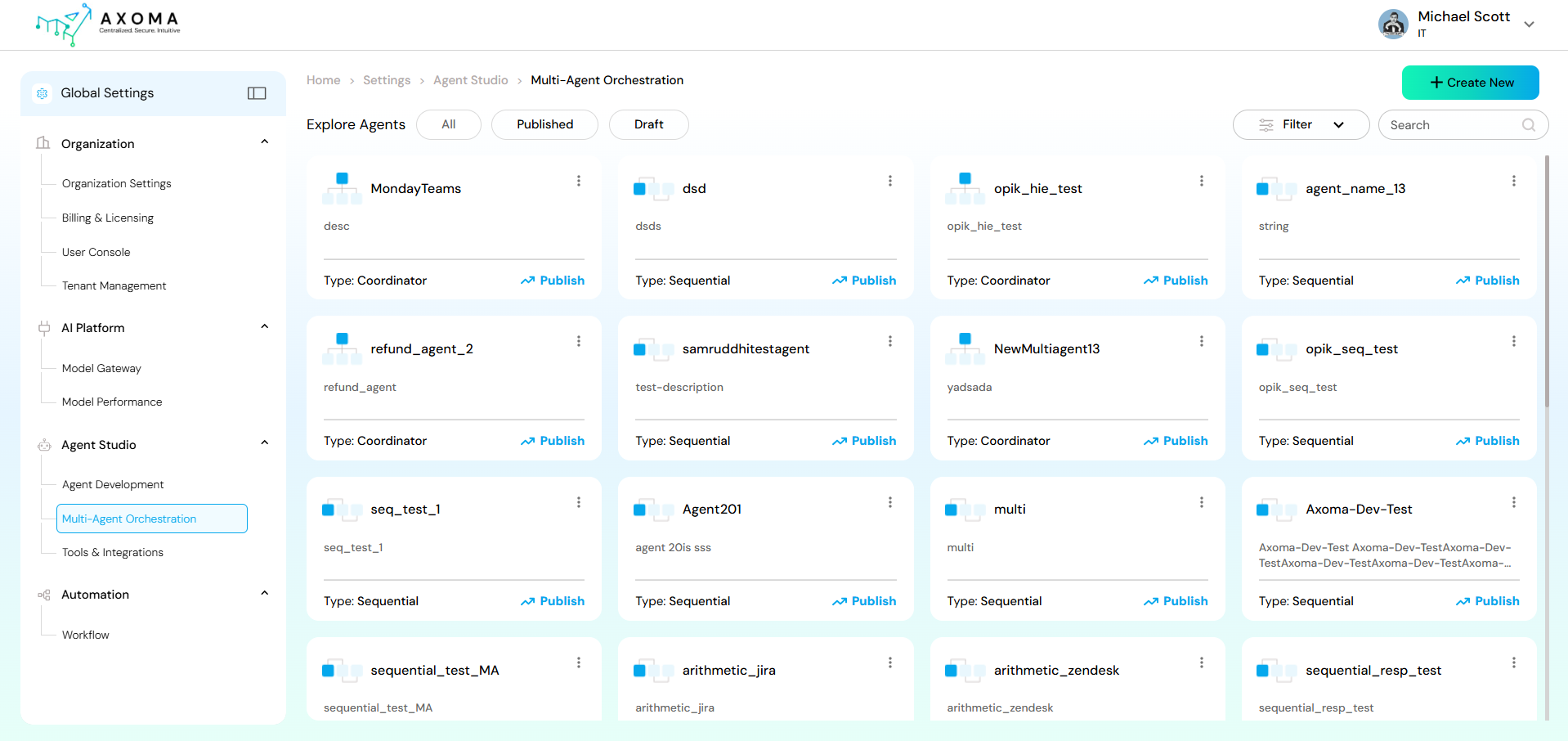 A Multi-Agent System is an application where several agents, often arranged hierarchically or sequentially, collaborate to achieve a shared objective. Axoma supports two primary coordination models for these systems: **Sequential** and **Coordinator.**
## Creating a New Multi-Agent System
A Multi-Agent System is an application where several agents, often arranged hierarchically or sequentially, collaborate to achieve a shared objective. Axoma supports two primary coordination models for these systems: **Sequential** and **Coordinator.**
## Creating a New Multi-Agent System
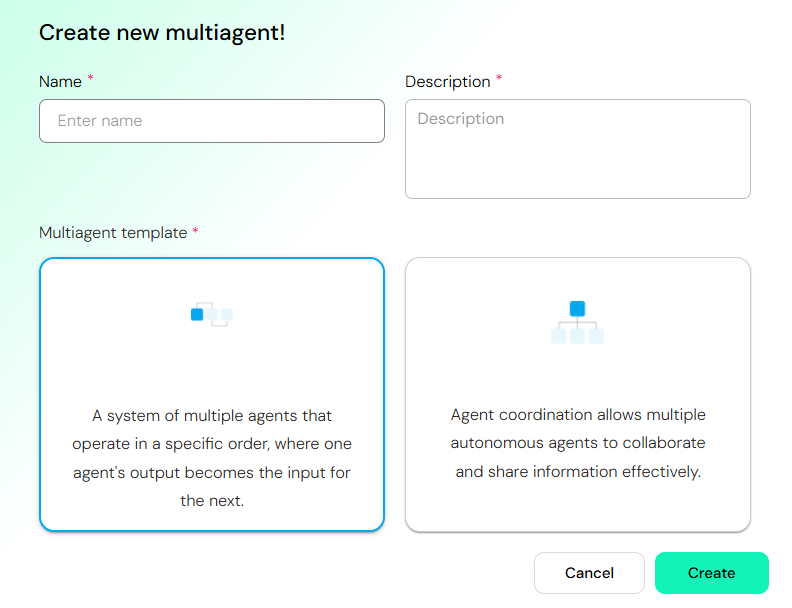 1. Navigate to the **Agent Studio** section in the left-hand menu and select **Multi-Agent Orchestration**.
2. Click the **+ Create New button** (top right).
3. A dialog will appear prompting you to define the new multi-agent system.
4. Enter details:
* Name: A unique, descriptive name for your multi-agent system (e.g., "CustomerSupportFlow").
* Description: A brief explanation of the system's purpose.
5. **Select a Multi-agent template**: Choose the coordination model that best suits your application's needs:
* **Sequential**: Select this for pipeline-like workflows where agents operate in a fixed, linear order.
* **Coordinator**: Select this for dynamic, complex workflows where a dedicated agent manages and delegates tasks to specialized sub-agents.
6. **Click Create.**
## Sequential Setup
In a Sequential Setup, agents execute tasks in a defined, linear order. The **output or result of one agent automatically becomes the input for the next agent** in the sequence.
**Best for**: Pipeline workflows (e.g., Data Processing → Analysis → Reporting), specialized step-by-step processes.
**Example**: TranscriberAgent → TranslatorAgent → SendEmailAgent.
1. Navigate to the **Agent Studio** section in the left-hand menu and select **Multi-Agent Orchestration**.
2. Click the **+ Create New button** (top right).
3. A dialog will appear prompting you to define the new multi-agent system.
4. Enter details:
* Name: A unique, descriptive name for your multi-agent system (e.g., "CustomerSupportFlow").
* Description: A brief explanation of the system's purpose.
5. **Select a Multi-agent template**: Choose the coordination model that best suits your application's needs:
* **Sequential**: Select this for pipeline-like workflows where agents operate in a fixed, linear order.
* **Coordinator**: Select this for dynamic, complex workflows where a dedicated agent manages and delegates tasks to specialized sub-agents.
6. **Click Create.**
## Sequential Setup
In a Sequential Setup, agents execute tasks in a defined, linear order. The **output or result of one agent automatically becomes the input for the next agent** in the sequence.
**Best for**: Pipeline workflows (e.g., Data Processing → Analysis → Reporting), specialized step-by-step processes.
**Example**: TranscriberAgent → TranslatorAgent → SendEmailAgent.
 ### Building the Sequential Flow
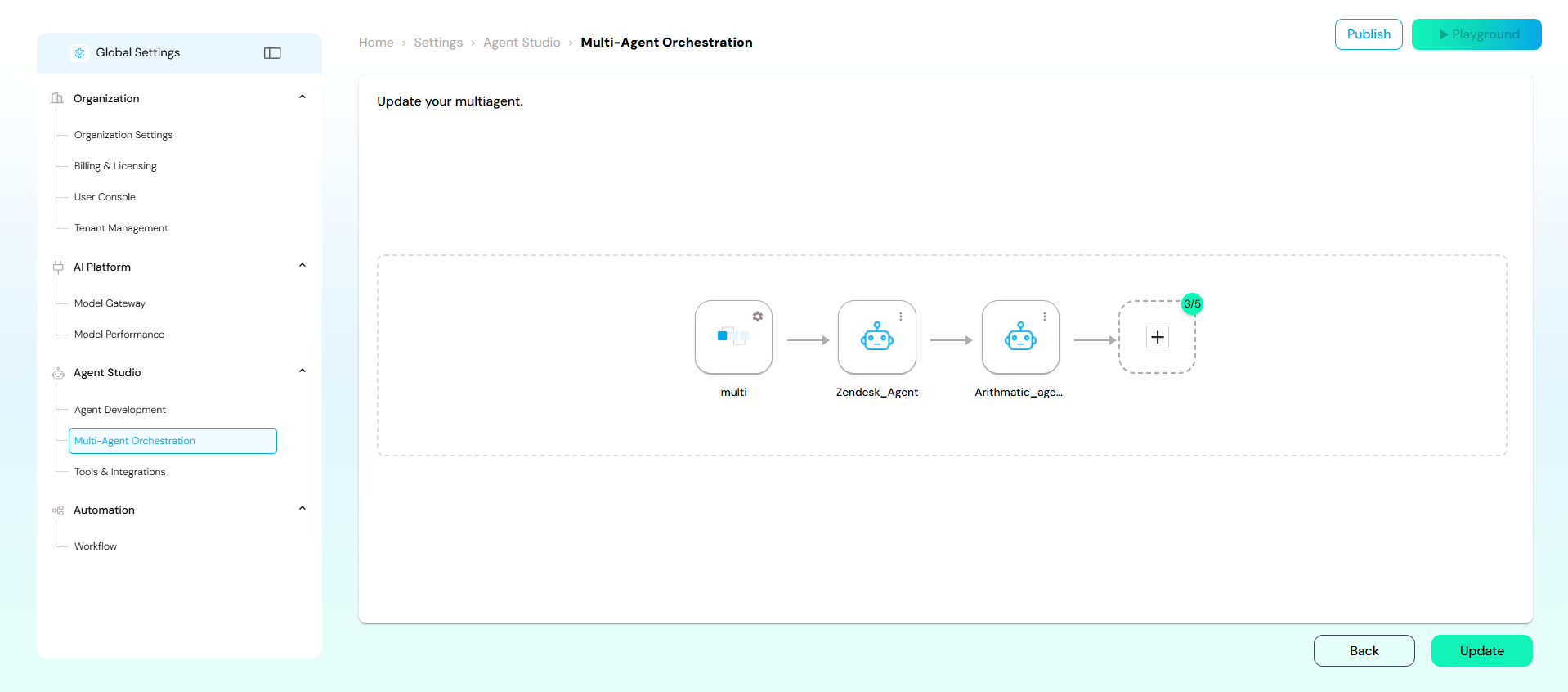
* After selecting the **Sequential** template, you will be taken to the orchestration canvas (similar to ma4.png).
* Your flow begins with a multi agent, which represents the system's entry point.
* Click the + button or drag-and-drop an agent from the library (if available) to add agents to the sequence.
* **Connect Agents**: Agents are automatically connected in a linear fashion.
* Configure: Click on each agent node to configure its specific settings, model, and tools.
* **Finalize**: The sequence can end with an agent that produces the final output.
* Click **Update** to save the changes or Publish to make the multi-agent system active.
## Coordinator Setup
In a Coordinator Setup, a dedicated Coordinator Agent manages and orchestrates the interactions between multiple specialized sub-agents. The coordinator delegates subtasks, aggregates results from sub-agents, and maintains global context.
**Best for**: Dynamic, conversational, or parallel collaboration patterns where agents handle separate concerns that contribute to a unified outcome.
### Building the Sequential Flow
* After selecting the **Sequential** template, you will be taken to the orchestration canvas (similar to ma4.png).
* Your flow begins with a multi agent, which represents the system's entry point.
* Click the + button or drag-and-drop an agent from the library (if available) to add agents to the sequence.
* **Connect Agents**: Agents are automatically connected in a linear fashion.
* Configure: Click on each agent node to configure its specific settings, model, and tools.
* **Finalize**: The sequence can end with an agent that produces the final output.
* Click **Update** to save the changes or Publish to make the multi-agent system active.
## Coordinator Setup
In a Coordinator Setup, a dedicated Coordinator Agent manages and orchestrates the interactions between multiple specialized sub-agents. The coordinator delegates subtasks, aggregates results from sub-agents, and maintains global context.
**Best for**: Dynamic, conversational, or parallel collaboration patterns where agents handle separate concerns that contribute to a unified outcome.
 ### Building the Coordinator Flow
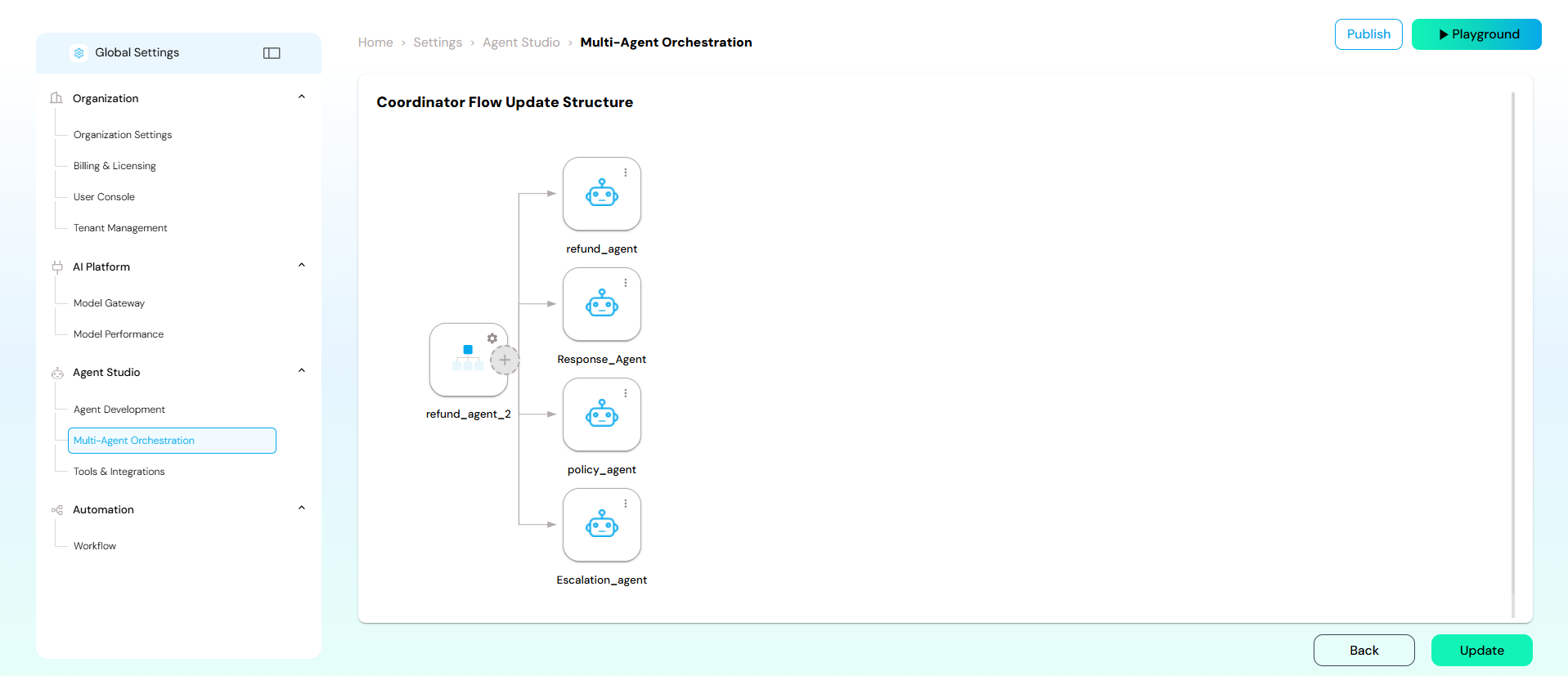
* After selecting the **Coordinator** template, you will be taken to the orchestration canvas.
* The flow starts with the primary **Coordinator Agent**.
* **Add Sub-Agents**: Drag and drop or add specialized agents that the Coordinator will utilize.
* **Define Control Flow**: The flow diagram visually represents how the Coordinator interacts with its sub-agents. In this structure, the Coordinator dynamically calls upon the appropriate sub-agent based on the input and the overall task.
* **Configure**: Ensure each agent and the Coordinator itself are configured with the necessary tools, context, and logic to perform their respective roles.
Click **Update** to save the changes or **Publish** to make the multi-agent system active.
### Building the Coordinator Flow
* After selecting the **Coordinator** template, you will be taken to the orchestration canvas.
* The flow starts with the primary **Coordinator Agent**.
* **Add Sub-Agents**: Drag and drop or add specialized agents that the Coordinator will utilize.
* **Define Control Flow**: The flow diagram visually represents how the Coordinator interacts with its sub-agents. In this structure, the Coordinator dynamically calls upon the appropriate sub-agent based on the input and the overall task.
* **Configure**: Ensure each agent and the Coordinator itself are configured with the necessary tools, context, and logic to perform their respective roles.
Click **Update** to save the changes or **Publish** to make the multi-agent system active.