The Model Gateway Key feature in App Settings allows Admins and Super Admins to validate API keys that
were previously generated in the LLM Management service.
This ensures that only authenticated and properly configured keys are used within the application.
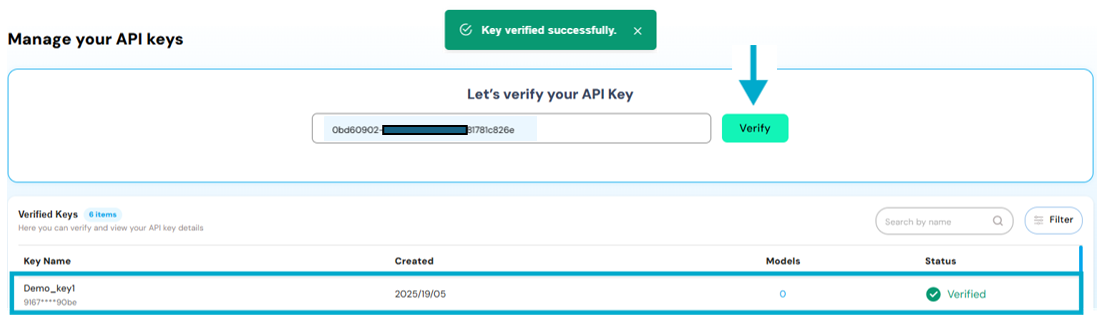
A generated key at LLM Management (along with embedding or language models), navigate to App Settings > API Key Verification.
Paste the generated key into the input field and click Verify
On successful verification, the key is added to the list of available keys for the app.
All associated models linked to the key will also be displayed at Models column with number of added models. By clicking on given number user will be able to see the window with all the added models and fallback information.
This process ensures only authorized keys and model configurations are connected to your app, maintaining secure and structured model access.
Embedded Models & Language Models in App Settings:Once a key is created in the LLM Gateway, and models (either Language Models or Embedding Models) are configured against that key, they become available for
selection within the respective sections in App Settings of any created app.
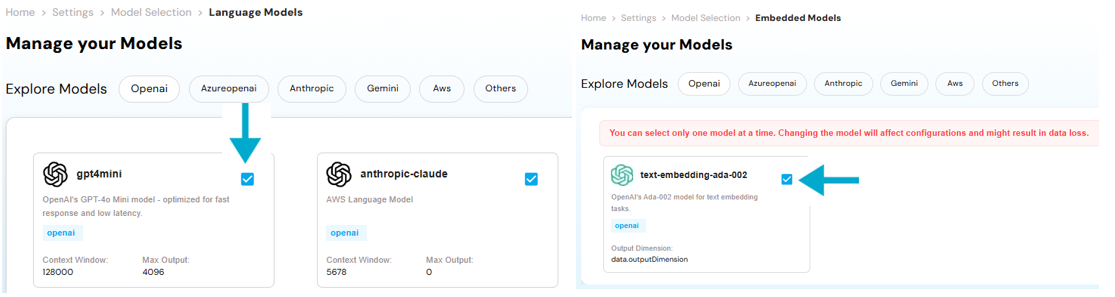
This section displays all the Language Models (e.g., OpenAI, Anthropic, Google, Amazon, etc.)
configured under the selected key. Within this section, Admins can:
View all available language models linked to the app.
Select desired models by checking the corresponding boxes.
Enable or disable models for use within the app interface.
This section lists the Embedding Models associated with the selected key, which are used for semantic search, RAG, and contextual understanding. Admins can:
View and manage the list of embedding models tied to the app.
Select appropriate models by checking their boxes.
Note: You can select only One Embedding Model using the checkbox in this section to ensure the app
can perform document-based or context-aware operations.
These model configurations are controlled at the app level and ensure seamless model orchestration, governed centrally
via secure API keys.


 Embedded Models & Language Models in App Settings:
Once a key is created in the LLM Gateway, and models (either Language Models or Embedding Models) are configured against that key, they become available for
selection within the respective sections in App Settings of any created app.
Embedded Models & Language Models in App Settings:
Once a key is created in the LLM Gateway, and models (either Language Models or Embedding Models) are configured against that key, they become available for
selection within the respective sections in App Settings of any created app.