Skip to main contentWelcome to AXOMA! Step into the future of intelligent enterprise operations with Axoma your all-in-one AI orchestration platform.
Whether you’re building smart agents, connecting enterprise tools, or deploying powerful language models,
Axoma brings everything together in one intuitive interface.
This documentation is your companion to navigating Axoma’s powerful features from seamless integrations and real-time automation
to advanced AI capabilities like document chat, sentiment analysis, and responsible AI controls.
Let’s get you set up, activated, and fully optimized to unlock smarter workflows across your organization.
Role Based Feature Access
In our application, feature access is tailored based on user roles to ensure a secure and streamlined experience.
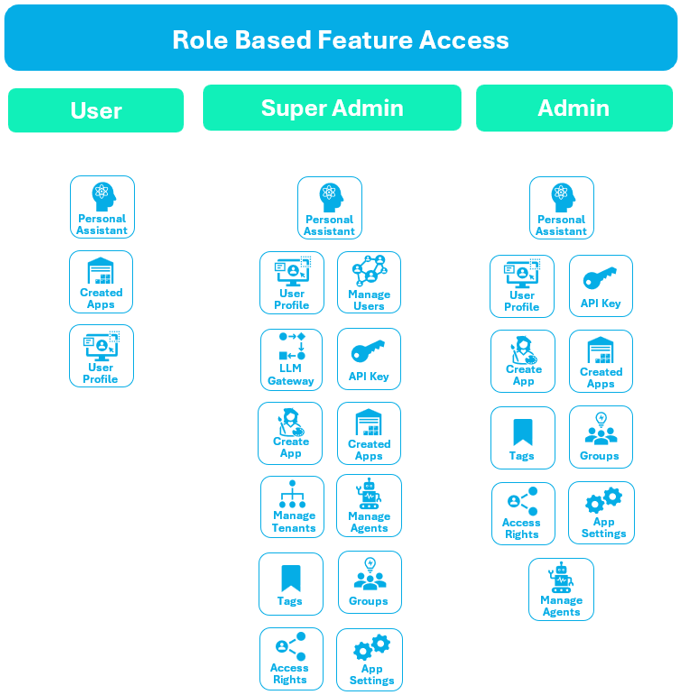
There are three primary roles: User, Admin, and Superadmin, each with specific permissions. A User has access to essential
features such as their User Profile, Created Apps, and the Personal Assistant. An Admin enjoys extended functionality, including
everything a User can access, along with advanced capabilities like Manage Agents, Create Apps, App Settings, Tags, Groups,
Access Rights, API Key Management, Language and Embedding Models, File Upload, and System Prompts. The Superadmin holds the
highest level of access, encompassing all Admin features and additional administrative controls such as Manage Tenants, Manage
Users, and the LLM Gateway. This role-based structure ensures that users only interact with features relevant to their
responsibilities, promoting both usability and security.
 This role-based access control system not only enhances data protection but also helps maintain operational clarity
across the platform. By limiting access to sensitive and configuration-level features based on roles, we ensure that
each user can focus on their core tasks without unnecessary complexity. For example, while Users can build and manage their
own apps with the help of the Personal Assistant, Admins are empowered to oversee and configure app environments
for broader teams. Superadmins, on the other hand, are responsible for organization-wide settings and user management,
ensuring the platform runs smoothly at scale. This structured approach creates a balanced, efficient, and secure user
experience for all roles.
This role-based access control system not only enhances data protection but also helps maintain operational clarity
across the platform. By limiting access to sensitive and configuration-level features based on roles, we ensure that
each user can focus on their core tasks without unnecessary complexity. For example, while Users can build and manage their
own apps with the help of the Personal Assistant, Admins are empowered to oversee and configure app environments
for broader teams. Superadmins, on the other hand, are responsible for organization-wide settings and user management,
ensuring the platform runs smoothly at scale. This structured approach creates a balanced, efficient, and secure user
experience for all roles.
User
The User role is designed for general platform interaction without administrative privileges. Users can:
- Access and interact with applications built on the platform.
- Use the Personal Assistant for LLM-powered conversations.
- Manage their own profile.
This architecture ensures a clean and secure interface where users can consume features without altering core configurations or managing system-wide settings.
It’s ideal for customers, clients, or internal users who need to engage with the applications but not manage them.
Admin
The Admin role serves as the operational backbone of the platform. Admins can:
- Create and manage apps and their settings.
- Configure agents, permissions, and access rights.
- Select LLMs and embedding models.
- Upload files and manage tagging and group structures.
Admins operate within the scope of a tenant or workspace, handling feature-level configurations without full platform-level control.
The architecture promotes modular governance and operational flexibility for managing workflows and teams.
Super Admin
The Super Admin role represents the highest level of access within the platform. Super Admins can:
Core Responsibilities
- Manage all users and tenants across the platform.
- Create, update, and disable tenants; assign users and roles accordingly.
- Configure the LLM Gateway, including API key management, model setup, and budgeting controls.
- Oversee all modules such as Agent Management, LLM Evaluation, App Settings, and more.
- Define, edit, and enforce Access Rights, Tags, and Group configurations.
- Perform system-wide integrations and manage external tool connectivity.
- Monitor platform activity and ensure compliance with security and usage policies.
Exclusive Access: Global Settings
The Super Admin role represents the highest level of authority within the AXOMA platform. Super Admins hold full administrative privileges, enabling them to govern, configure, and oversee all aspects of the system.
- Tenant Management
- User Management
- LLM Management
- Agent Management
- System-Wide Configurations
This architecture provides a centralized authority for system governance, onboarding, and infrastructure-level decisions.
It ensures secure, multi-tenant control, allowing Super Admins to maintain operational integrity across the entire platform.